This evening we installed a major update to Yacapaca. The new features turn it into a general-purpose assessment platform that does everything paper-based assessment did, only better. We have been working towards this for two long years, and you cannot imagine how happy I am to finally see it come to fruition.
You will find the new features represented throughout Yacapaca by icons. Here is what they are, and what they mean.
The Yacapaca assessment types
 |
Short-text test Tests that are quick to write, administer and mark. These tests work in just the same way as their familiar paper equivalents, but they save a lot of time. |
 |
ePortfolio As students work through a course, they collect all the relevant material in one place. Unlike a paper file, you can monitor, comment and mark at any time. At the end of the course, the student can download the entire portfolio into an attractive standalone website on CD to send to the examiner, or just keep as a record. |
 |
Free-text survey Find out what your students (or their parents) think about any topic you choose. Traditionally, the pain of surveys is collating all the answers afterwards. Yacapaca does it automatically, as they are entered. The free-text survey is very flexible and easy to set up, but it does not analyse the results, only compiles them |
 |
Quiz The original core of Yacapaca. Multiple-choice tests with a range of question types: choose-1, checkbox, location, cloze, drag’n’drop. Tests can include formative feedback and they are presented via a range of attractive animated templates. |
 |
Website Get your students to build complete websites using our online tools, then export them to the school’s intranet server (or anywhere else) to show off to their friends. View the sites remotely yourself as they are being built, and help students improve them by commenting on each page |
 |
Multiple-choice survey The multiple-choice survey uses the same question-types as the quiz, but with the right/wrong answer notion expunged. Multiple-choice surveys take longer to set up than their free-text siblings, but they analyse the results as well as collating them. Which is better really depends on the number of people you expect to survey. |
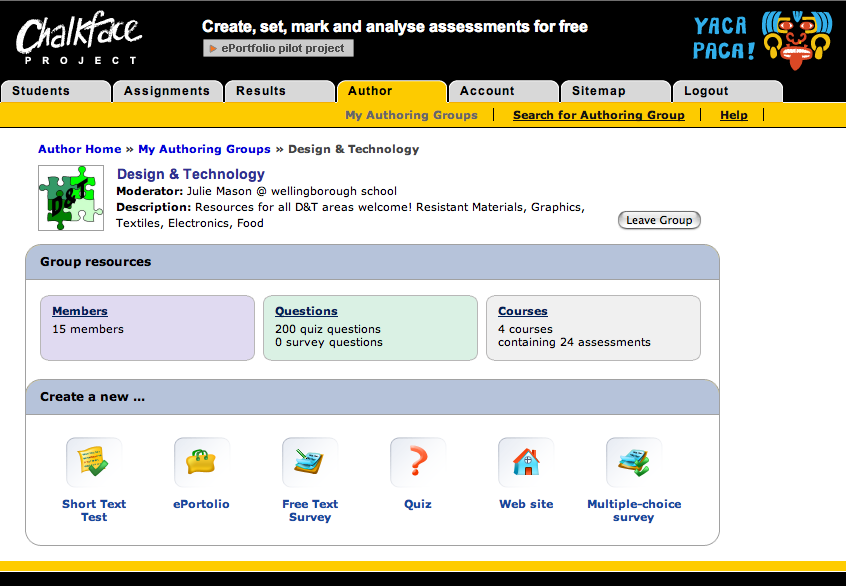
Of course there are not yet many examples of the new assessment types in the Assignments list, but it is dead easy to create your own. Simply join an appropriate author group, and away you go. The author homepage now makes it especially easy to get started once you have joined the group.
Credit for all this is due to the hardworking Chalkface programmers; in particular Sergej (team leader) and Igor (wrote the pilot scheme), but also Vic, Alex, Max, Sasha, Vika and several more without whom Yacapaca would still be but a twinkle in my eye.
Update: I have had requests for examples of student output. Here are some from last year.


 Chalkface Blog
Leave a comment