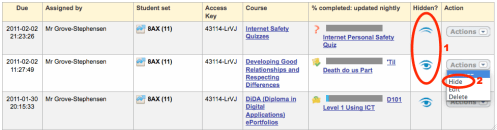
We have added some more tools to make controlled assessments easier to manage. In your Assignments List, you can now hide an assignment from students, or reveal it again, with a single action.
In the annotated screen shot above
1. The hide/show icons show you clearly what is visible to students, and what not.
2. From the Actions dropdown, choose “Hide” or “Show” to change the visibility of the assignment.
A hidden item simply disappears from the student’s To-Do list. It won’t disappear if they actually have it open and are working on it, so accidentally hiding will not cause mid-lesson consternation.
It is now the work of seconds to unlock an assignment (an ePortfolio, for example) at the beginning of a lesson, and lock it again at the end. This fulfils the controlled assessment criteria of all the exam boards.


Leave a Reply