• There is solid research to show that students slip backwards over the summer. You didn’t need telling that, did you? It is a common experience that, come September, you are going to have to rehearse the learning from last year.

    I’d like to suggest a way that Yacapaca can reduce this problem, if not actually eliminate it. It hinges around two powerful but under-used features: timed assignments, and teams. The method does require some preparation, which is why I am blogging this now, three weeks before the end of term across most of England.

    The core concept is very simple; one quiz per week through the summer, to keep the key concepts fresh in students’ minds. The challenge is maximising the number of students who actually take the quizzes; just dumping a list of quizzes on them is not going to work.

    You need to be a bit more subtle and use two tools – timed reminders and peer pressure. Here’s the sequence.

    1. Make sure all your students have their email addresses registered on Yacapaca. They can add it via the ‘Account’ tab. You will be much better off with their Hotmail accounts than their official school ones that they never check.
    2. Check the teams the students are in and do some activities now to build those teams. The peer pressure component will only work if the students feel their teams are real, and are organised to support each other.
    3. Set your weekly quizzes as six separate assignments, not as one big assignment. Set the start and end dates of each assignment so they must be done in that particular week; Yacapaca will automatically email reminders to students at the start of each assignment. You may imagine that being more flexible will increase the response, but all it will do is encourage procrastination. Of course some students will not be able to complete some quizzes, but that’s OK. It is the overall effect you are after.
    4. The only thing you need to do is check the results weekly and announce the winning team (not the winning individual, please! That will only demotivate those who know they will never win). How do you do announce? Easy! Use a Quick Assignment, with responses switched off so it becomes a broadcast tool. Some weeks you won’t be free to do this, but don’t worry. It’s all about creating the rhythm.
    5. At the start of next term, make a big fuss of the winning teams and hand out prizes. I predict that you will have at least four winning teams out of six assignments, provided the teams were well-balanced in the first place. Yacapaca automatically balances teams so that’s not hard to achieve.

    One caveat: please don’t mess with the system. The five stages form a chain. Drop one, and the chain is broken.

    If you need any support setting this up, write to me or one of the support team (support@yacapaca.com) and we will gladly give you all the help you need.

  • New author Bob Mathews has been experimenting with different ways to create Maths questions. He is using MathType to create some very sophisticated notation, but the problem is how to present this in quizzes.

    Bob explains

    I had to save the equation as a GIF, upload the GIF, then drag it over to the quiz. What seemed to work best (I’m using MathType) was (more…)
  • Looks like people are getting survey fatigue: only 46 responses to this one. Still worthwhile, though.

    Who replied?

    Image

    This looks fairly representative of the population as a whole.

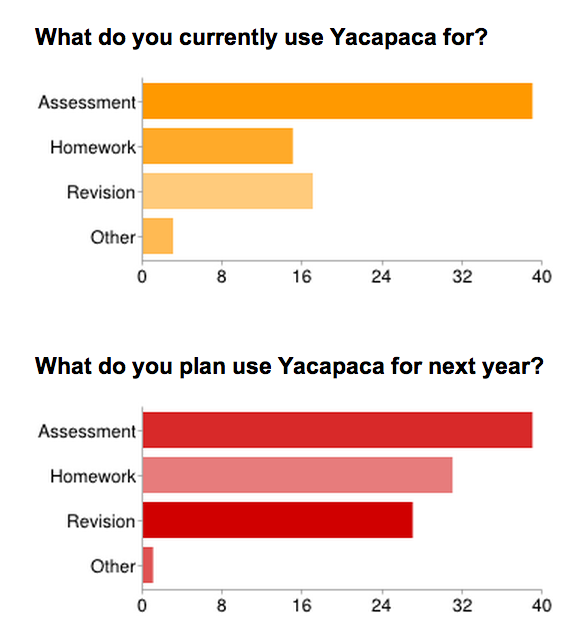
    What do they use Yacapaca for?

    Image

    My interest here was how plans are changing. Homework and revision are both on the way up, but I was surprised to see homework featuring more in future plans than revision does.

    Here are some of the feature requests that came up. My apologies if yours is not covered.

    Feature requests that we could action

    • Flight paths. I think we should replace the Progress Charts with these.
    • Per-student usage report, especially for revision.
    • Download data with separate student forename and surname (why don’t we do this already?)

    Requests for features that already exist

    • Re-insert incorrectly answered questions into the quiz at a later point. Yes, we have that! It’s in Revision Streams but not in quizzes as this would sabotage the quiz as a summative assessment.
    • Tests correlated to national standards (e.g. National Curriculum). They all are. If you don’t see the results you need, check the settings of the student set.
    • Resources matched to the National Curriculum. All that can be, already are. If you want more, write them.
    • See results analysed by gender, SEN status, etc. If you have that metadata in your student records, then this analysis is now available from the Assignments list. It’s a brand new feature, so no shame if you didn’t know that was there.
    • See student sets even when they have no results. You can see these in the list of student sets, from the top of the Students dropdown.
    • See a report immediately after a quiz is finished. Access all reports via the dropdowns in the Assignments list. No need to wait for the email.

    Requests for features we had in the past but have removed

    • Moodle integration. What a waste of money that was. Even the people who had campaigned for it didn’t use it in the end.
    • Author control over quiz timing. Utter chaos until we removed that. Most authors didn’t  have a clue how to use it, but used it anyway – the result was a total mess for the rest of us.
    • Allow students to use the Back button in tests. What happened? The kids would guess the answer, then repeatedly go back until they stumbled across the right one. No knowledge or thinking-through required.

    Requests for features we definitely won’t do

    • Sign-on integration with your local system. We’ve looked into this several times and the bottom line is it’s a morass. It never works as well as you hoped, and breaks whenever any of the other vendors changes their system. What we do have is brilliantly simple tools to upload students and for them to then set their logins to something easy to remember. Use them!
    • Edmodo integration. I appreciate that Edmodo is the new Moodle, but that does not make it any more attractive from my point of view.
    • Anything involving printing out. This is the 21st Century.

    Overall, no-one asked for anything gobsmackingly new or different, but I did get a strong steer that we should focus on homework as a key use-case. It is also clear that we are falling down on user education. Given that I can’t have one-to-one conversations with every teacher, I need to find more ways to facilitate teachers helping each other.

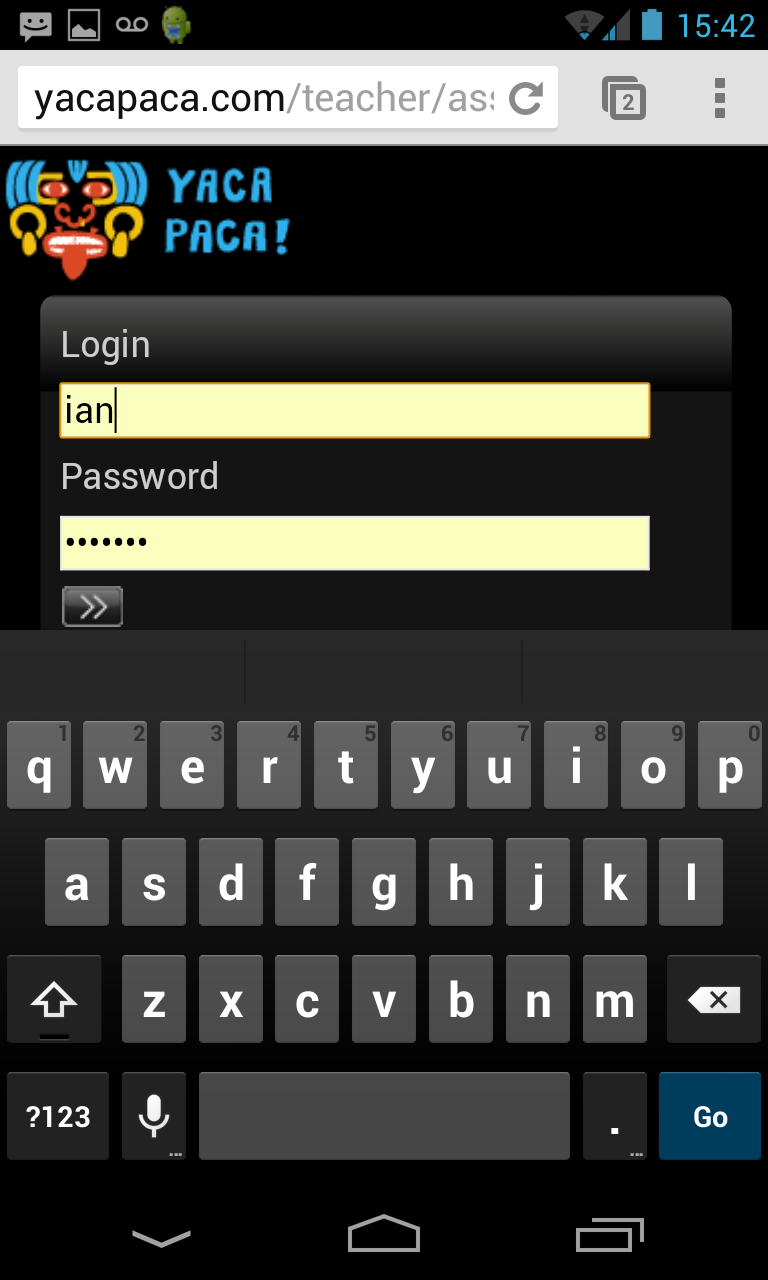
  • This screenshot is me logging into Yacapaca on my phone.

    Don’t be fooled by the large image here: it’s just an ordinary smartphone (actually an LG Nexus 4); not even an iPhone.


    Image

    We redesigned the login fields so they actually grow larger as the screen grows smaller. You can see that here it almost fills the screen to make entering your password easier.

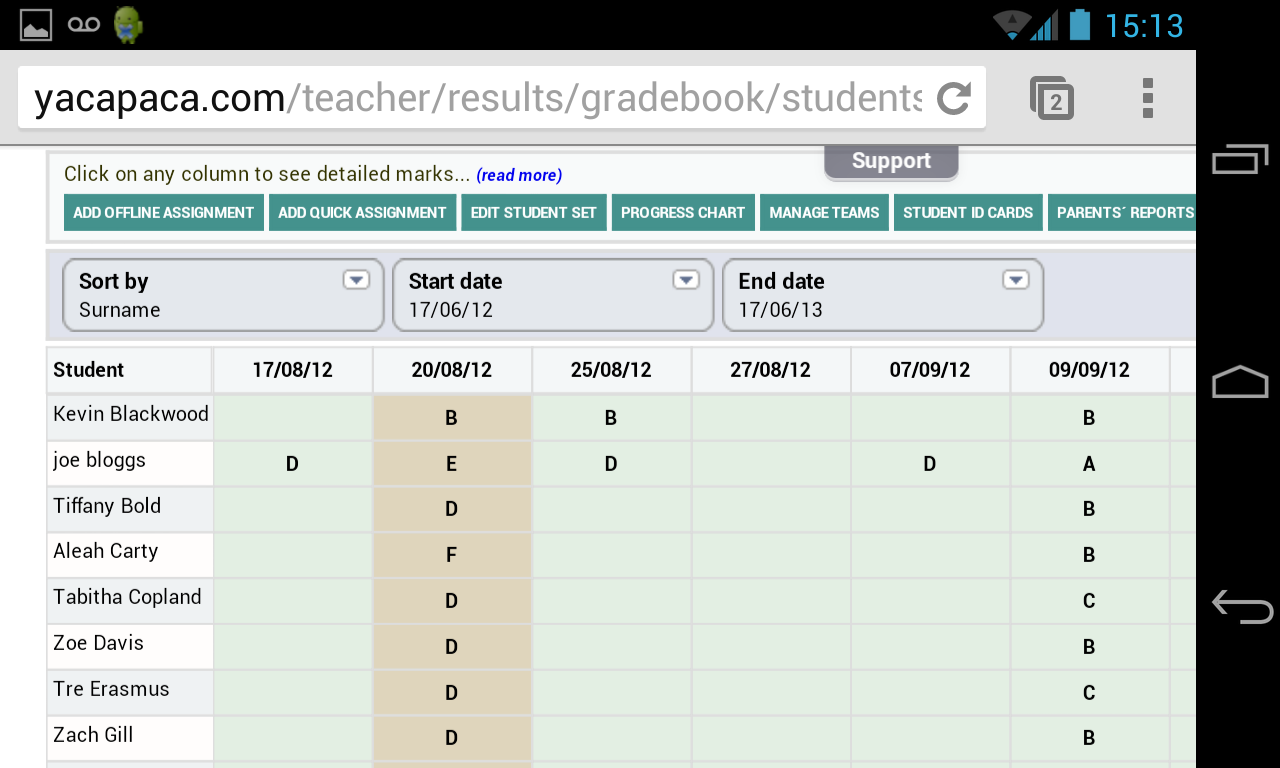
    and this is the Gradebook, also on the phone

    Image

    I didn’t expect the Gradebook to be practical on a little phone screen, even though it’s technically possible, but actually it works quite well. The inner table scrolls intelligently (two-finger scroll) to keep the names and column titles visible. I was able to track students and update their targets without difficulty. This works even better on an iPad.

    What’s next?

    The main work on making quizzes work on iPhones and other mobile devices proceeds apace. We have got the ‘quiz runner’ working in wireframe (i.e. without design) now, and we are in the process of debugging it. I’m not prepared to commit to a launch date for it yet, but if you would like your school to be a beta test site, now’s the time to get in touch.

  • Image

    We launched the Revision Access system later in the term than I would have liked, but now that it’s up and running there is finally some user data to start garnering insights from.

    It’s certainly working; the log shows students revising through the half term, some of them with considerable diligence. However, I see some problems that I want to address.

    Give everyone access

    First and foremost, by making it a separate product we denied access to a lot of students who would have liked to use it. It may surprise you to know that there’s a major thread on the students’ forum demanding more quizzes, so we know there is an unfulfilled demand.

    So from September, Revision will be a standard feature of Yacapaca, available through your existing subscription – even through free subscriptions. We will put it on the same meter as regular quizzes, with appropriate teacher controls to ensure you use up only the credits you choose to assign.

    Better topic management

    With Revision, students are supposed to indicate which topics they have completed, and then retain those topics in their lists. Yacapaca will automatically construct a spaced-practice review schedule, using Ebbinghaus’ principle. What I’m seeing in the usage logs is that many students don’t understand this. They are adding topics that are not useful to them, e.g. I see the same student adding both A-level and KS3 topics.

    The solution will be to constrain what students can revise to only the syllabi of their student set. Technically, that is quite easy. I’m also wondering if we can parse from the quizzes they do which topics have been covered, so they can’t run on and try to revise topics that have not been covered in class. I suspect making that work reliably would require a fair bit of artificial intelligence.

    At the same time as adding topics not yet covered, some students are clicking off the topic once they feel they have revised it. Without reinforcement, they are going to have forgotten it again by the time they get into the exam. We will have to move the ability to remove topics from the list back to teachers. I’m a little hesitant about that because it undermines the ‘student in charge’ philosophy, but I see no option if we are going to support students to revise as effectively as possible.

    More motivation

    Revision already uses the points and avatars that motivate students to do quizzes. I want to add teams as well. You may know that I’m wary of individual leaderboards, because for every winner, you create a loser. It’s at best net-neutral. Teams are different. Properly selected and maintained, they give even the weakest student in the class a taste of what it’s like to be a winner – and once they get the taste, they’ll want more of it.

    Teacher feedback

    Currently, Revision offers no built-in tracking tools of the kind you have in the rest of Yacapaca. The data is all there; the reporting pages are simply not built yet. I’m still trying to work out just what’s needed; but there certainly should be something in place next term. Once it’s there, we can refine it with your feedback.