
We get a lot of enquiries like this one from Geoff Welch.
- When setting up pupils how do we set up pupil accounts so that different staff can set tasks for the same pupils?
Time for a screencast!
Great teachers spend less time marking and more time teaching
We get a lot of enquiries like this one from Geoff Welch.
Time for a screencast!
When I tried to make this point it ran to 1,052 words. So, instead here’s the way the inspiring Mr Moses did it, in just 52 words and a picture.
Question: Do you teach like this?
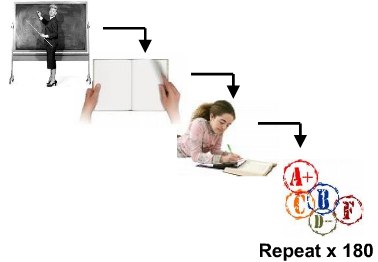
If so, tell me how and why that can’t be automated? Record your lecture once. Give your students a reading. Give your students a worksheet. Grade and repeat.
Don’t think that teaching this way can be done with just the computer and without you? Think again.
Yacapaca has just this minute hit 1000 teacher signing on in a single day, and I’m dancing around the room in glee.
If you are a Yacapaca author you will know about this already; if not, you are in for a treat. After procrastinating for a full year, I have finally done the decent thing and allowed any teacher to make their own Yacapaca content public. The result is that we now have an astonishing 554 courses available to use, across a big range of subjects.
In ICT alone there are 189 courses, ranging from the well-known KS3 Baseline assessments to a whole course on Java programming. Of course ICT is best-represented, but the main subjects all have a lot to offer:
But it’s not all mainstream. One of the great delights of Yacapaca for me is the way people are using it to create courses in real niche subjects:
…and my favourite: Judo! Just look at this fantastic quiz on hold-downs. Great use of images and extremely well-written formative feedback.
If you want to find your own favourites, don’t just look at the subject categories. Use the search, and see what else is hiding in there to delight you and assess your students!