Daniel Burrows wrote in with an interesting question yesterday:
I have just setup my first test and course in yacapaca.com, but I have a problem with how little room I am allowed in feedback (see attached). Is there anyway I can allow my students to scroll, or make the default font bigger?
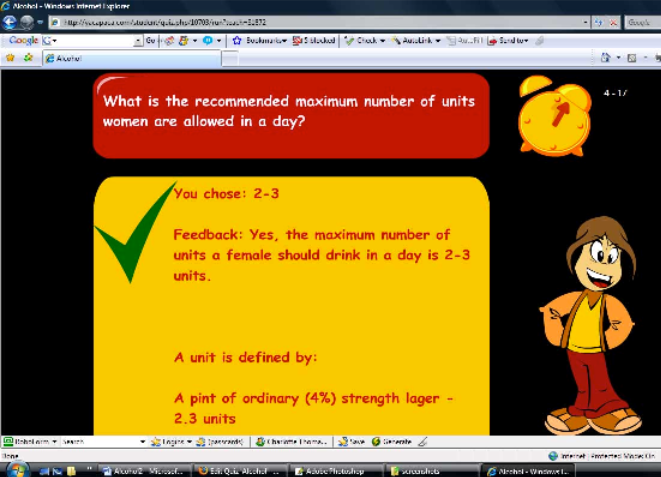
The Yacapaca quiz templates certainly do not permit very much text, so variations on this request are common. Here is why we limit the text in the way we do, and what you can do to get around it.
Start by thinking about the emotional state students are in when taking a Yacapaca quiz. The quiz templates are deliberately game-like. They use time pressure and immediate rewards to keep students in an energetic, focused ‘uptime’ state. This is a great state for taking in keywords and associations, and it’s a very bad state for thinking things through in depth.
I recommend you work with, not against, this uptime state. In Daniel’s example, the student has correctly identified 2-3 as the recommended maximum number of units of alcohol for an adult female. Daniel wants to reinforce and extend this learning. I would take just one tidbit of information, such as “3 units is just 2 bottles of WKD!”. This stands a good chance of being taken in, even whilst the student’s attention is already shifting onto the next question. It is surprising how these little tidbits add up to extend a student’s appreciation of the subject.
But what if you want to use a quiz to instill some more in-depth knowledge? You can do it with a three-part strategy and a new feature: pre-test instructions in HTML. In this system, you use the quiz primarily as a motivator, and put the extended text elsewhere.
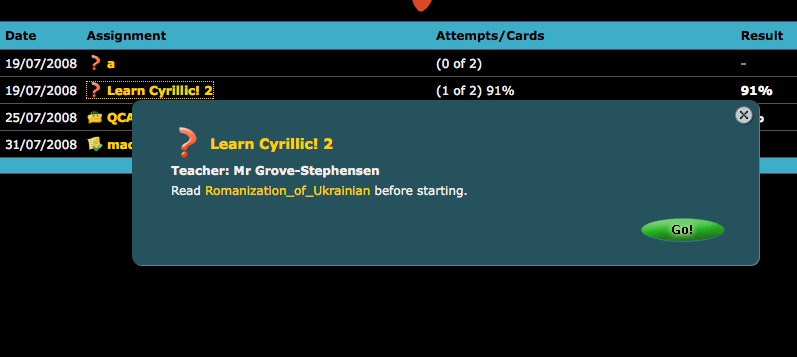
When creating a quiz, you can write pre-test instructions which the students see before starting the quiz. Most authors ignore them, but they can be very powerful. In the screenshot below, I have used them to link to a relevant Wikipedia page. This saved me a lot of writing, too.
Now, here is the strategy. Set the quiz with two attempts. Tell the students they will be marked on the second attempt only (not the best: the first attempt is ignored even if by chance they do better in it). Now, students who fail to live up to their own expectations in the first test have both the means (the pre-test text) and the motivation (better marks on the second attempt) to learn the material you want them to cover.
You can enhance the strategy by creating the quiz on two different templates; quick and easy to do if your questions are well-tagged.
- First quiz on a feedback-at-end template where students can easily review their answers.
- Time for reading the pre-test instructions, or anything linked from them.
- Second quiz (same questions) on a feedback-per-question template to increase their motivation in the moment.
Give it a go, and leave a comment about how you got on.

