Quick Assignments are a way to quickly assign, collect and grade written work. Unlike quizzes they won’t do the marking for you, but they will save you a lot of time and temper.
Now we have made them even quicker, by copying the Assign Again feature from quiz assignments.
Once you have created a Quick Assignment for one student sets, it is the work of seconds to assign it to more sets. In the assignments list:
Actions ->Assign again
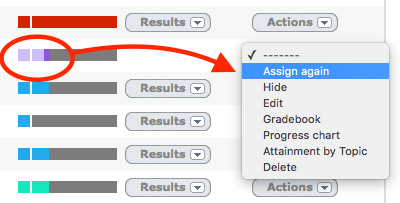
Select the new student set and you’re done.
Benefits
- It is easier to use the Yacapaca Gradebook as your main mark book, saving hours of copying into spreadsheets.
- Quickly set exams and tests.
- Helps us calibrate your grade book and give you more accurate quiz results.
Incidentally, Quick Assignments do not eat your credits. Use them as much as you like; they are completely free.
 Chalkface Blog
Leave a reply to Tutorial 5: The Assignments List | Yacapaca Cancel reply