• Some of these updates, particularly those relating to due dates, are tripping up both teachers and students at the moment. So, please, take note!

    1. Due dates are real! Many students are not used to the idea that work really does have to be handed in when you say it does. Assignments are locked after the due date; please make your students aware of that! The default due date is 7 days from the assignment date, but you can change it to anything up to a whole term ahead.
    2. Only stuff that needs to be done is in the to-do list. Students’ to-do lists now show only work that is current, sorted by due date with the most urgent items at the top. Completed or out-of-date items are moved to their Archive. Students can manually archive or unarchive any item at any time.
    3. Old, undated, assignments now have due dates. Work set some time ago was cluttering up students’ to-do lists, so we added due dates of [assignment date + 100 days]. For a few users of ePortfolios, this turned out to be too aggressive and live tasks got locked and archived. You can easily re-date those assignments; see below.
    4. Edit due dates at any time. Select ‘Edit’ from the Action dropdown in the Assignments list.
    5. Allow extra quiz attempts. If students lose quiz attempts due to system crashes etc, you can allow additional attempts. As above, use ‘Edit’ from the Action dropdown. You will only see the additional controls for students who have somehow lost attempts.
    6. Quickly duplicate an assignment. If you regularly re-set the same assignment, or set the same assignment to multiple student sets, you can now do it in two clicks from the Assignments Page. Choose ‘Assign Again’ from the Action dropdown.
    7. Progress charts screencast. Teachers who use the Progress Charts love them; here’s the 4-minute guide to how they work.
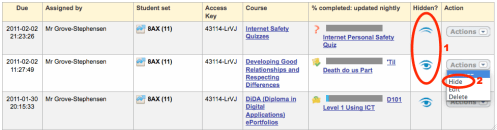
  • We have added some more tools to make controlled assessments easier to manage. In your Assignments List, you can now hide an (more…)

  • People (including your students) fall into broadly two groups

    • those who like to get stuff out of the way as soon as possible
    • those who leave things until the last minute.

    There is a third group of people who do things in an orderly, scheduled manner, but it’s very small.

    What proportion of your students is in each group? My guess is that the second group accounts for more than half.

    The do-it-nowers will complete your Yacapaca assignments as soon as they appear in their to-do lists. Hooray! They are sorted, unless you overwhelm them with too much work.

    The last-minuters will do it the night before it’s due. So what happens if you set some work with no date, or a date far in the future? They won’t do it at all. Set a few of these, and those students will come to see Yacapaca as something they are supposed to ignore, and your confidence, in turn, will be knocked.

    My advice is to set no more than 1-3 quizzes or one written task at a time, with a short deadline. The Yacapaca default is a week, but make it shorter if you can. If you want to line stuff up ahead of time, set start dates as well, so there is still only a short window during which students know they must complete the work.

    This is another place teams can be really useful. Make team success meaningful by offering praise and prizes for the winning team. Slackers will then come under peer pressure to complete, as their personal results affect their team’s chances of winning.

    Combine these two techniques and I guarantee your completion rate (and your students’ results) will rise.

  • How utterly depressing. Michael Gove wants to take a curriculum already groaning under the weight of too much content and add more ‘facts’.

    70 years ago, Albert Einstein famously asked “why should I clutter my brain with information that is readily available from reference sources?”. Yet, in the age of Google, Gove still doesn’t get it. Where on earth was he brought up?

    Whilst I am proud that my work supports the state educational system, there is no way I will put my own kids through it if this is the direction it is going in. I want them prepared for the challenges of the 21st Century, not the 19th.

  • Milestone reached

    100,000 questions in the question bank. We passed this milestone during September. As well as representing a truly humbling commitment from our authors, it is also represents a stunning teaching resource. Consider:

    • 100,000 question is 10,000 per each of 10 main subjects.
    • Across 5 years of secondary school to GCSE, that’s 2,000 questions per subject per year…
    • …which is 30 weeks x 67 questions.
    • Assuming you need to differentiate across three ability bands, that comes out as one, 22-question quiz per week, per subject, throughout Secondary school.

    So you now have no excuses left for not knowing the current attainment level of each of your students!

    Milestones missed

    75,000 registered teachers. As I write (New Year’s Eve) we have exactly 74,863 so we missed it by just 117 teachers. Bah.

    2 million registered members in total. We’ve got 1,935,622 members in total (except that is the November figure: I’ll update it when I get the Decembers stats in the morning). Actually, I don’t feel so bad about this because 2010 has really been about developing new things to do with the students you have already registered.

    Some of the new features we have launched

    Much of the work we have done this year has been ‘under the hood’ to cope with the increasing server load, but we’ve still made time for some great new features. Here is a partial list:

    • Reporting by grades: tell us the grade scheme of your student set, and we will report progress in those grades. Sounds simple, but it required a massive statistical exercise to achieve.
    • Progress charts: you only get to see these once there is enough data about the student set, but teachers who use them report that they are a fantastic aid for discussing progress with students.
    • Offline assignments: not officially announced yet, but they are in the interface. If you have ever wanted a markbook that gave instant, online feedback to students, here it is.
    • Structured Peer Assessment: I have really let this experimental system languish this year. There has been some progress, but not as much as I would have liked.
    • Student module redesign: The new interface has been a hit with both teachers an students. Not rolled out to all schools yet.
    • School groups: Who in your school also uses Yacapaca? And who is more experienced and able to help you? The school group will tell you.
    • Simpler assigning: There is a lot of choice in the assigning process now, so to make it easier for newbies we separated all the detail decisions into separate ‘expert’ screens, and set the most popular values as the defaults.

    Not a bad year, all in all.