• From the studio of Mike Highfield (who also produces our training CDs) comes a new two-minute demo of what Yacapaca is all about. Enjoy!

    View full size

    I want to get the word out as far and wide as I can, so please do embed this in your own blog or school website, where other teachers can find it. Here is the embed code:

    <iframe src=”http://demo.yacapaca.com/demo2/demo-v27.swf&#8221; frameborder=”0″ height=”465″ scrolling=”no” width=”620″> </iframe>

    If you would like to just link to it, I recommend the full-size version, which also has built-in video controls: http://demo.yacapaca.com/

  • The Applied GCSEs in Business and ICT were a huge hit when we introduced them 2002. Recently, they have languished somewhat as they have moved from the old Paperless School platform to Yacapaca. Now, the move is complete, and I’d like to update you with the resultant changes:

    Business

    Price reduction
    I have reduced the cost from £25.00 per student to just £9.95 per student. The development costs are all paid off, and I would rather see the two courses continue to be used than worry about squeezing the last drop of profit out of them. The photocopy master course packs will now be sold separately.

    Find the courses on Yacapaca (requires login)

    Which versions to use
    The Paperless School version will be discontinued over the Summer Hols. If you are locked into that and not experiencing problems, there is no reason to change until then.

    The ePortfolio Pilot Project is being wound up now, but tasks assigned within it are quite safe until August. If you are already delivering through Yacapaca, I recommend you move to the integrated tasks right away; they simply work better, and have much easier marking.

    Business Encyclopedia Glossary…
    …is finally fixed. In the end we did the decent thing and rewrote the program from scratch.

    The message board…
    …has been permanently scrapped. That is one feature that never lived up to expectations.

    Access controls
    I am determined to keep everthing on Yacapaca absolutely free, which means that access to the course activities is free. We do still need to charge something for these courses, so to controll access we are putting password protection on the Business and ICT Encyclopedias. If you are a current customer, you will shortly be receiving an email with your password details for this.

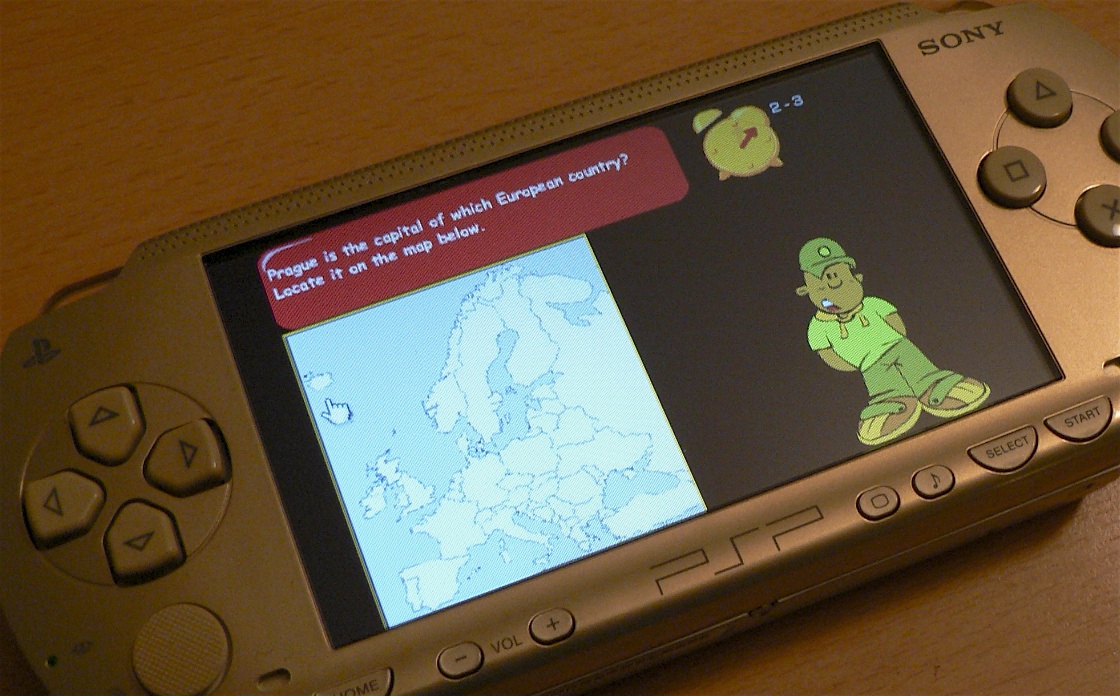
  • PSP running Yacapaca

    In January I speculated that Apple’s iPhone would soon be seen in classrooms. That post drew such a strong response that I was prompted to go looking for better alternatives that are available now. I think I’ve found one in the Sony PSP, and I am sufficiently convinced that I have approached Sony (via their educational distributor ConnectED) to make them available to Chalkface customers.

    The title of the post was deliberately provocative (of course!); it might be better to say that a couple of class sets of PSPs would very nicely augment your current computer suites. Here is now they measure up:

    How PSPs are better than laptops

    • Much, much cheaper. You can put online, multimedia education into the hands of at least five children for every one with a laptop.
    • Wi-fi enabled out of the box. No expensive re-cabling of the school.
    • Parental-purchase friendly. Not just because of the low price, either. Students see PSPs as technology designed for them, and will actively campaign for them on your behalf.
    • More portable. Whether you are shunting them round the school, or students are taking them home to do homework on, the logistics suddenly get a lot easier.
      Great for multimedia especially as the education bundle comes with still/video camera as standard.
    • Small and discreet enough not to interfere with classroom practice.

    How PSPs are worse than laptops

    • No built-in keyboard. The on-screen text entry is rubbish, frankly (Tengo could be very nicely adapted to PSP, and should be), but the PSP will work with an external keyboard.
    • Small screen. It’s 480×272 pixels, compared to 800×600 for a typical laptop. Browsing complex websites involves a fair bit of scrolling; simpler websites like Yacapaca are fine.
    • No Microsoft applications. If what you are teaching is spreadsheets, a PSP won’t be much good.

    Obviously this is an analysis coloured by my view that educational content should be delivered via the web, and that delivery should not get in the way of teachers continuing to teach. The PSP won’t dominate your classroom the way laptops would, but at the same time you only have to look at the way students drive their social lives through TXT and MMS on their phones, to realise the power of small devices matched to nimble fingers.

    If you are intrigued by the idea and want to research other teachers’ opinions, here are a few I have gathered together:

    • Handheld Learning: Very well-informed discussion on this specialist message board.
    • Changing the Game: Bucks LEA advisor Ian Usher’s blog. This was the post that first turned me on to the potential of the PSP – thanks Ian!
    • HECC: Wiki page of PSP-related resources, including some very good stuff on RSS feeds.

    We are going to have a very small number of demo units available on sale or return soon; let me know if you would like to get on the list for one. Priority will go to regular blog readers and existing Chalkface customers. Product details here.

  • This evening we installed a major update to Yacapaca. The new features turn it into a general-purpose assessment platform that does everything paper-based assessment did, only better. We have been working towards this for two long years, and you cannot imagine how happy I am to finally see it come to fruition.

    You will find the new features represented throughout Yacapaca by icons. Here is what they are, and what they mean.

    The Yacapaca assessment types

    short-text test Short-text test
    Tests that are quick to write, administer and mark. These tests work in just the same way as their familiar paper equivalents, but they save a lot of time.
    ePortfolio ePortfolio
    As students work through a course, they collect all the relevant material in one place. Unlike a paper file, you can monitor, comment and mark at any time. At the end of the course, the student can download the entire portfolio into an attractive standalone website on CD to send to the examiner, or just keep as a record.
    free-text survey Free-text survey
    Find out what your students (or their parents) think about any topic you choose. Traditionally, the pain of surveys is collating all the answers afterwards. Yacapaca does it automatically, as they are entered. The free-text survey is very flexible and easy to set up, but it does not analyse the results, only compiles them
    Quiz Quiz
    The original core of Yacapaca. Multiple-choice tests with a range of question types: choose-1, checkbox, location, cloze, drag’n’drop. Tests can include formative feedback and they are presented via a range of attractive animated templates.
    Website Website
    Get your students to build complete websites using our online tools, then export them to the school’s intranet server (or anywhere else) to show off to their friends. View the sites remotely yourself as they are being built, and help students improve them by commenting on each page
    Multiple-choice survey Multiple-choice survey
    The multiple-choice survey uses the same question-types as the quiz, but with the right/wrong answer notion expunged. Multiple-choice surveys take longer to set up than their free-text siblings, but they analyse the results as well as collating them. Which is better really depends on the number of people you expect to survey.

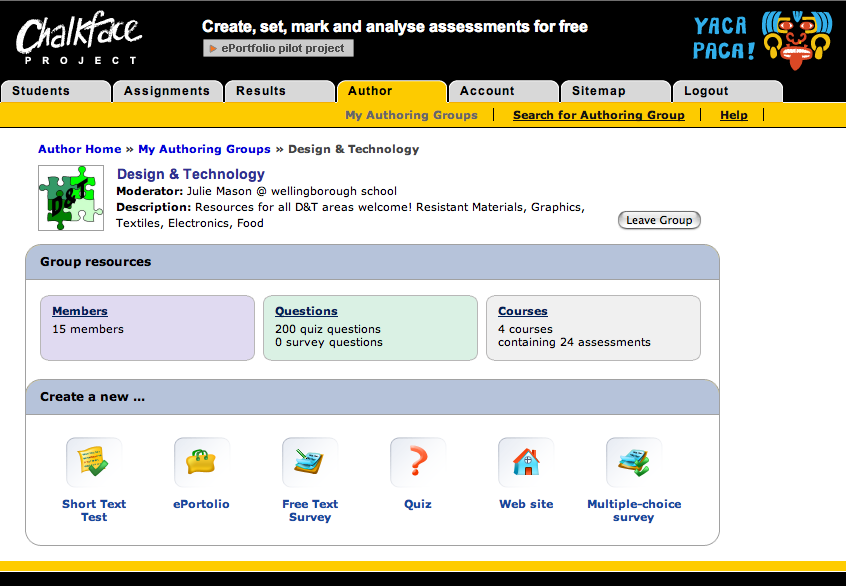
    Of course there are not yet many examples of the new assessment types in the Assignments list, but it is dead easy to create your own. Simply join an appropriate author group, and away you go. The author homepage now makes it especially easy to get started once you have joined the group.

    Author-group homepage

    Credit for all this is due to the hardworking Chalkface programmers; in particular Sergej (team leader) and Igor (wrote the pilot scheme), but also Vic, Alex, Max, Sasha, Vika and several more without whom Yacapaca would still be but a twinkle in my eye.

    Update: I have had requests for examples of student output. Here are some from last year.

  • Dave Corbett, the author of all these History tests is now setting homework via his blog. What I really love is the way Dave is pulling in resources from all over the web – podcasts from the BBC, Wikpedia pages, other History teachers’ sites, Yacapaca (of course) – and linking them up with minimal text of his own to manage his childrens’ homeworks. And it’s not costing Dave or his school a bean.

    Inspiring.