• I can’t say I’m convinced ‘Controlled Assessment’ is really a step forward. Is it really the job of teachers to prevent children from learning when and where they want to?

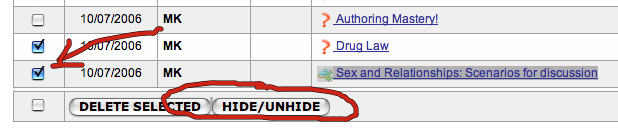
    But, ours not to question why. At least with a Yacapaca ePortfolio you can switch student access on and off using the ‘hide’ feature in the Assignments List.

    Hide/Unhide

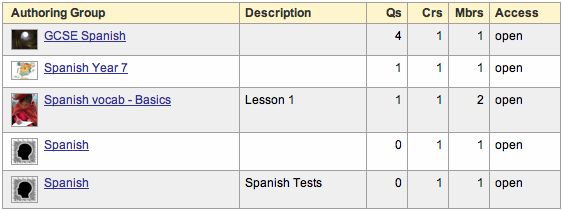
  • Until recently, language materials have been noticeable on Yacapaca only by their absense. I have had correspondence recently with a few teachers who are starting to write materials – particularly quizzes and short-text tests. I thought it would interesting to look at just how the subject is developing. Here are the authoring groups currently named for languages. Only some are public, i.e. appearing in the Author Groups lists and available to join:

    Language Public Total
    Spanish 3 6
    French 0 3
    German 0 1
    Russian 1 1
    MFL (gen) 1 2
    Latin 1 4

    Of these, only the Latin and Russian groups have any significant resources in them as yet. The others have a smattering of questions and perhaps a couple of short-texts. Experience shows that most of these fizzle, but some will fly. The ones that succeed are those that gain critical mass early on their lives, usually driven by the energy of a single author, and then broaden out to develop their own creative community.

    So, if you are thinking of writing MFL resources, what is your best strategy for long-term success? Start your own author group and risk duplicating the effort of others? Or join in one that is already going, but if so, which? Here is my recommendation:

    1. Join all the authoring groups for your language.
    2. Write to the group moderator (you can do this as a group member) and ask about their plans. If you get a positive and energetic response, make that group your “authoring home”. If not, leave the group and move on.
    3. If all that fails, start your own authoring group. Make it public and publicise it with a nice colophon and well-written explanation of what it’s about. Engage with anyone who joins (or applies to join if it is ‘Moderated’ type) and let your enthusiasm infect them. But don’t kid yourself; it won’t take off until you have written a good stack of initial content.
  •  


    Update 2013: the I Am Clever materials have now been permanently retired. Thanks for your interest. I am Clever

    Back in 1999 we thought it would be a pretty cool experiment to add an online component to Chalkface packs. Students could do homeworks or extension activities online, and have them emailed back to the teacher. So we created a website called iamclever.org that encapsulated these ideas in a set of nice little web forms, and linked it to the lesson plans of a couple of dozen Chalkface packs.

    Nobody used it. As far as I could tell, it got absolute zero usage for two years. Discouraged, we let the system fall into abeyance and concentrated on other projects. And then, about two years ago, we started getting a trickle of complaints from teachers who still had those packs and were now ready to try out the web homeworks.

    It wasn’t really practical to resuscitate the old iamclever.org site, so instead, my colleague Victoria has spent the last couple of weeks moving the assignments across to Yacapaca. If you are a Yacapaca member, you will find them here.

    Some assignments had to be abandoned, generally because they contained too many dead links.

    Technically, they work really nicely now. They are easy to set and easy to mark. The activities themselves are a bit variable. The staff who were writing them in 1999 were themselves inexperienced in using the web, and sometimes it shows. If they prove popular this time around, we will put some energy into improving them.

    Take a look, and let me know what you think.

  • Last week’s list of question types went down so well that I got motivated to do you another list, this time of ‘task’ types. ‘Task’ is Yacapaca-speak for what is also known as Subjective Asessment, or free-text. I have covered the principles of these already; this is a handy list of the actual settings for each type.

    The Yacapaca subjective-assessment task types

    Create tasks in any of these formats, by starting from the homepage of any author group of which you are a member.

    • Short Text
      Students enter plain text only, file uploads are disallowed and students may not add their own cards. Students answer one question per card, and the expectation is that the answer will be fairly short. As teacher, you can view all answers on a single page and mark each against a pre-written mark scheme.
    • ePortfolio
      Entry is HTML via the WYSIWYG editor, students can upload files and both add and delete cards from the original task you design. Marking is for the whole task. Teacher comments are enabled on each card, and the expectation is that you will use these to minute your conversation with the student as the ePortfolio develops.
    • Free-text survey
      Similar to the short-text test, except that marking and commenting are all switched off. You can download the responses to an Excel file so student can analyse the results.
    • Website
      Similar settings to the ePortfolio, except that the only file types that may be uploaded are those that can be embedded in a web page. You should require students to ensure that any uploaded file is actually visible on the page.

    Finally, a note for advanced users. You can manually change the task parameters to create the exact assessment type that you want. I have yet to document exactly how it all works, but don’t be afraid to experiment in the sandpit.

  • SHR banner

    If you would like to see a really thorough and comprehensive exposition of the course blog concept, loook no further than ICT@SHR from Tim Curtiss. I first spotted it because Tim is a Yacapaca member (and author), and refers his students to it in the blog (example).

    What is really inspiring, though, is the huge range of resources all being accessed by the students from this one central location. I have spotted links to resources from Cadbury, Revise ICT, Zamzar, Wayback Machine, the BBC, Teach-ICT, del.icio.us and many more.

    The enthusiasm just shines out of this blog, as does the structure and discipline. Take a look, for example, at how the different classes are addressed through a dropdown that filters the posts according to how they are tagged. Simple, easy-to-maintain and effective.

    How is it done, and how much did it cost? The course blog is a free account from WordPress.com (same software as this blog, btw) and as far as I can see, all the links are to free resources as well. Notable only by its absense is a £10,000/year school-wide VLE, which does not surprise me as Tim is doing far more than a VLE could, just with the free tools he’s using.

    This is emphatically not a zero cost resource, however. Tim (and/or his team – I don’t know the authorship structure) has put a great deal of time into creating this, and is continuing to do so. What will be interesting is to see how much work it is next year, when there is a previous year’s course to build on.