• Detail view

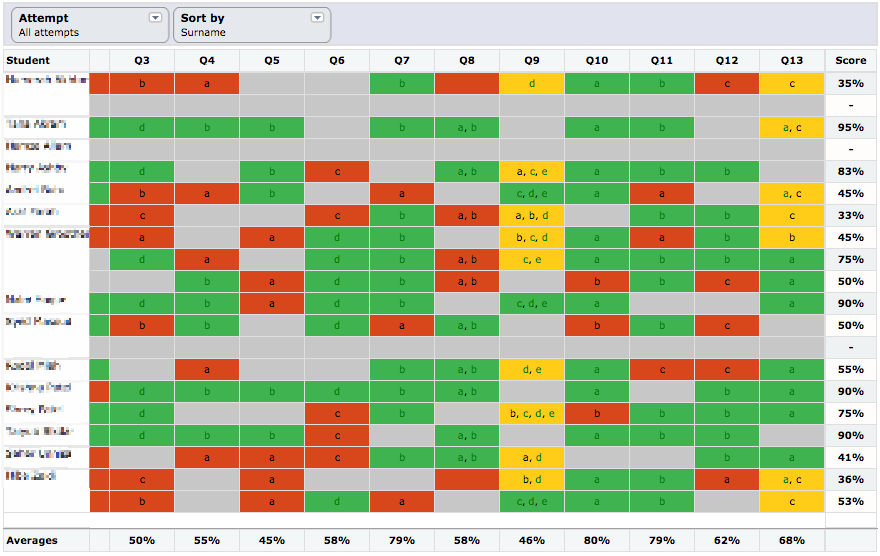
    If you want a per-student, per-question, per-attempt view of your results, come to

    Assignments tab -> Results -> Results in Detail

    You will see you have the traditional traffic-light colour-coding for correct, partial and incorrect answers.

    Grey cells are questions that were not presented. The Yacapaca model is that each quiz is a randomised selection of questions from an underlying question bank. You choose how (more…)

  • Alog screenshot

    As a teacher, you need to know things that raw scores won’t tell you. For example:

    • Which of your students really grasp the learning opportunity of formative assessment?
    • Which of your students are hopelessly optimistic (or pessimistic) about their chances in an exam?
    • Which concepts have they grasped, and in which do they need reinforcement?

    The best way to discover this is through one-to-one conversation, and if you have the time, that’s what you should do. For when you don’t have the time, there’s (more…)

  • You already know what a gradebook/markbook is. Every teacher grew up with them. The difference with the Yacapaca Gradebook is how much of the work it does for you. In this tutorial I am going to take you through 6 massive time-savers that you quite possibly did not know about.

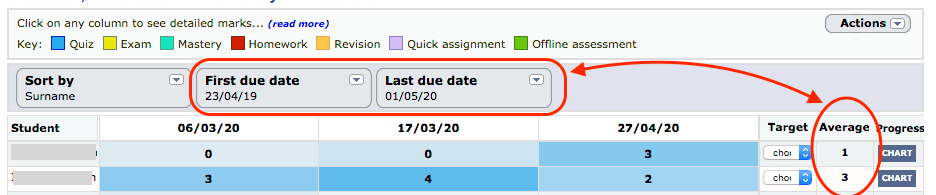
    Access the Gradebook for any student set via the Students menu. Any set that has data will appear in this dropdown; un-assessed sets don’t appear here.

    1. Average grades over whatever period you define

    gradebook 1
    Set the first and last dates to what you need, and get an instant average grade. And remember you can (more…)
  • Go to your Assignments List and you will see a colour-coding key across the top. 

    assignments

    Here is what they each mean. Do follow the embedded links if you have time; I have written extensively on each of these in the past, so this is (more…)

  • At the heart of the Yacapaca Teachers’ Module lies the Assignments list. This is your overview of both what your students should be doing, and what they are actually doing. It is the springboard to analytics and actions related to each assignment. Time to make friends…
    Assignments List

    1. Filter and search

    After you have been using Yacapaca for a while, the Assignments list becomes quite (more…)