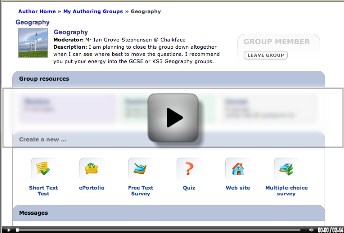
• Screencast

    Sandra Lothian from the New South Wales YMCA asked a question (login req) in the Yacapaca forum yesterday:

    Once you have created a quiz, short-text assessment or eportfolio. Where do you go to preview what it will look like?


    A great chance to try out Jing, a ‘casual screencasting’ tool I’ve just started using. Here’s how it works. Once installed, Jing leaves a little menu permanently on your screen. At any time you can define an area of the screen and start recording it. When done, click the ‘share’ button and the video uploads itself to a server and send back a url that you can use as a link. In the case of the video I did for Sandra it’s http://www.screencast.com/t/W_KliBfnvW

    Until now, screencasts have been quite complicated to make. You had to master a powerful program like Captivate (PC only – yuk!), organise hosting, get an FTP program to upload files, etc, etc. For the screencast-based Yacapaca Training Disk, I hired the extremely competent Mike Highfield to do it all for us, and got a great result. But that took money and time as you will know if you were one of the people we kept waiting for the new disk.


    For on-the-fly class teaching Jing is a brilliant tool. Jing itself is free, but the screencast hoting service that makes it so compelling cost £3.50/month after the first two months. If you use it regularly (and I think I shall), that’s astonishingly good value.

    Meanwhile – did my screencast do its job? Well, Sandra is blogging her experience of Yacapaca, so why not go and ask her!

  • If you’re not a Yaquapacista, stop reading now! None of this is going to make sense without a Yacapaca teacher login.

    Still here? OK, some folks have been requesting a ‘share logins’ feature over in the feature request discussion, which you are (more…)

  • It’s great having free services where you can upload educational videos. So many possible uses. But… which is the best one? I tried three; here are the results:

    YouTube

    Google Video

    Veoh

    Online Videos by Veoh.com

    If you’ve actually watched them all, it is really no contest. My thanks to Aidan McCanny for turning me on to Veoh.

  • Publishing a book the traditional way is a team effort. The Chalkface system involves an author, an editor, an illustrator, a proof-reader and a co-ordinator as a minimum. Each of these roles requires an entirely different skill-set, and excellence in each skill is predicated on having a particular personality.

    This is one reason that traditional book publishers throw up their (our?) hands in horror when they (we?) see Wikipedia allowing any Tom, Dick or Harry to wander in and actually publish content. Don’t they realise that quality cannot be consistently achieved without a team?

    Well, actually, the Wikipedians do realise this. And they have their own, very effective, teamwork format. It is not obvious at first glance, because it is entirely informal. Here is an example of how it works.

    • Tom has an idea for an article about, say, recumbent bicycles. He hacks out a potted history, based on his own, largely excellent, memory. He illustrates it with a couple of drawings of his own, and something he found on the internet.
    • Dick is also interested in recumbents, but he’s less of a go-for-it character than Tom. He had always intended to write this article but kept waiting until he was sure he’d got all his sources organised. Now when he reads Tom’s article, what he notices is all the mistakes. So he corrects them, cites the sources correctly, and removes that image because it was somebody else’s copyright.
    • Harry doesn’t care about recumbents at all, but he has a passion for clear language and correct grammar. To him, the article is a splendid opportunity to boldly nail some split infinitives and clean up typos.

    Thus, Tom, Dick and Harry progressively lift the quality of the article, each working from his own skill-set, and crucially each driven by his own route to personal satisfaction. Real article history here, for interest.

    When I started Yacapaca, I dreamed of applying exactly this model of content creation. I knew that writing good assessment material requires a mix of personalities and skills, and I hoped that if we provided the right platform, the necessary collaborative behaviour would spontaneously emerge.

    Until recently, I was getting a bit discouraged about this. The authoring section of Yacapaca still shows many teachers creating and jealously guarding their own materials, generally duplicating existing resources in the process. My faith, I admit, was wavering.

    Then, along came this fantastic exchange on one of our authoring message boards. You have to be logged in to see it, so I shall precis. Basically, one teacher is expressing some guilt at modifying the work of others, and experienced members are piling in to reassure him that it is entirely appropriate and really works for them.

    Folks have got the Wikipedia message, and are applying it to assessment resources. As usual, it was just my impatience getting in the way.

  • Message bloc

    After much nagging from members, we’ve finally introduced messaging into Yacapaca. An unaticipated consequence is that my productivity has fallen almost to zero. Watching users’ posts tick in is hypnotically addictive. It doesn’t help that I can overview, list , sort and select them using the site admin tools. Info junkie that I am, I’m now mainlining the self-introductions, questions and suggestions of teachers from across the English-speaking world.

    And it’s going to get worse. Sergej’s clever messaging engine allows us to attach messages to almost any object in the database. We already have a discussion area for each support group, and one for each authoring group. In principle, we could attach one to every course, quiz, task, question, teacher, student, assignment… even with that list, I think I’ve missed some. Fortunately for my sanity, not all of those would be used or desired by users – but some of them will be really beneficial to our growing community, and now the core software is written, they are relatively easy to implement.

    Which leaves me at serious risk of overdose.